Simon Says - A showcase of iPhone Duo and iOS 27
Simon Says Duo began with a simple goal: build a complete social experience around the iPhone Duo’s two-screen form factor. A party game gives those screens distinct jobs. The host chooses the challenge and judges the result. The participant watches their framing, listens to the instruction, and responds. Both people need information at the same time, and some of that information needs to stay with the host.
That makes Simon Says an unusually useful way to explore the device. The app brings together camera capture, a participant-facing external display, speech, timed visual instructions, local recording, replay, and turn management. The interesting part is how those pieces cooperate during an actual game, including what happens when someone rotates the phone, changes its configuration, or stops an attempt.
There is an important version distinction for developers following along. SwiftUI’s sceneAccessory(content:) foundation is available in iOS 27.0. The CameraCaptureAccessory and AVCaptureDeviceDirectionCoordinator APIs used by this implementation are available in iOS 27.1 in the installed SDK. Simon Says Duo currently targets iOS 27.1. It demonstrates the iOS 27 generation of experiences, with its camera-specific external-screen implementation depending on 27.1.
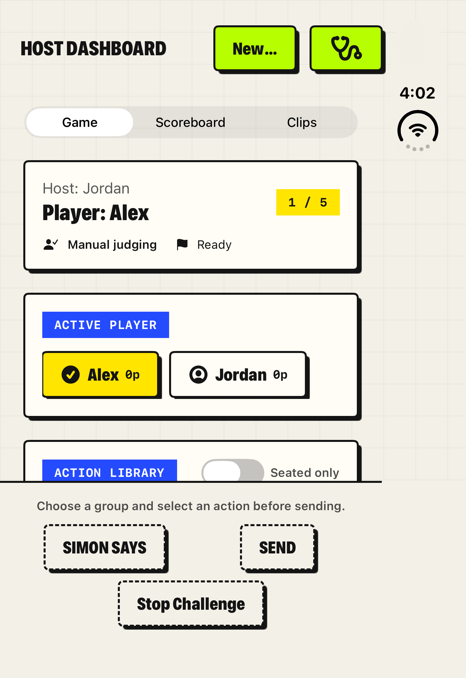
The host dashboard on the iPhone Duo simulator running iOS 27.1. Screenshots in this post are unmodified captures from an isolated, nonrecording demonstration session; the simulator’s system status strip remains visible at the right.
A game designed for the people on both sides of the phone.
A session starts with consent and setup. The group can include two to twelve named players, with one to ten scored challenges per turn. The host can adjust the response window, speech speed, action groups, and seated-friendly filtering. Spoken play also has a nonrecording option.
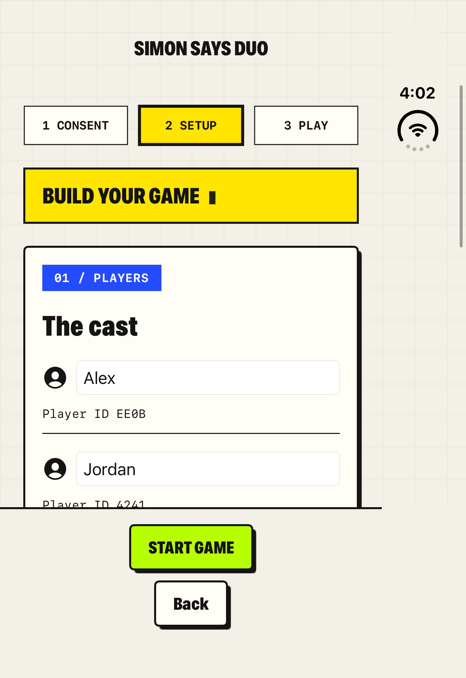
Setup makes the players and game configuration explicit before entering play.
Once play begins, the host works with a dashboard containing the active player, action library, challenge controls, and review tools. The participant receives a much smaller presentation: the camera preview, a status message, a countdown when appropriate, and a Stop control. Keeping these experiences separate lets the host prepare the next challenge without exposing its answer in advance.
The action library contains 50 cards across Poses, Hands, Balances, Movements, and Expressions. These categories give the camera different practical jobs. A hand challenge needs clear fingers. A balance challenge needs enough of the body in frame. An expression needs a useful view of the face. The catalog carries framing guidance alongside the action, and parameterized prompts can specify a finger count and the participant’s left, right, or either hand.
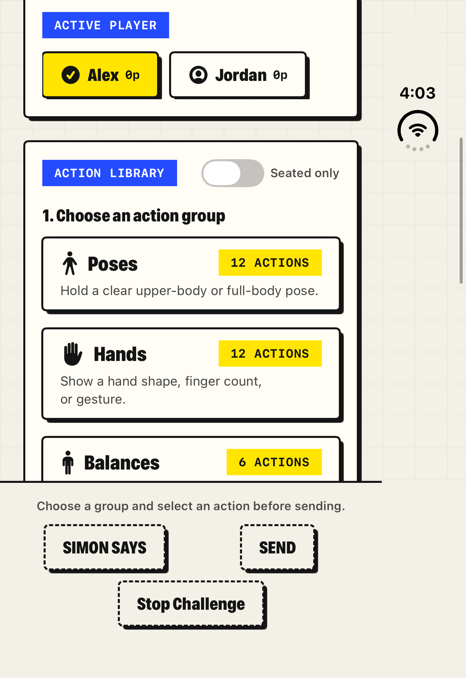
The grouped action picker. The send controls remain disabled until an action is selected and the other readiness requirements are met.
The app uses manual judging throughout. The host decides whether the participant followed the rule. That keeps the current experience honest about its capabilities: a category named Expressions does not imply facial-expression recognition, and a Hands card does not imply an automatic finger detector. The camera provides framing and a recording for review.
The external screen is an application surface.
The participant-facing screen is central to the design. It shows a mirrored camera preview so the person being recorded can check their position, keep their hands visible, and leave enough room for the selected action. Alongside that image, the app can present its own text and controls.
In ContentView, the host interface declares a camera scene accessory whose content is ParticipantView. The following excerpt simplifies the production declaration by omitting lifecycle and direction callbacks:
.sceneAccessory {
    CameraCaptureAccessory(isEnabled: $game.accessoryEnabled) {
        ParticipantView(
            presentation: game.participant,
            image: game.frame,
            simulated: false,
            stop: { game.voidAttempt() },
            directionChanged: { ids, outer in
                game.directionChanged(ids: ids, outer: outer)
            }
        )
    }
}
The content closure accepts a SwiftUI view. That gives the app a place to compose the participant experience: an image, text, a countdown, and interaction within the accessory’s presentation. SwiftUI’s scene accessory API provides the association with the app’s scene; the camera accessory supplies the specialized presentation used here.
This is how the external screen can say “Listen…” during speech, “Your turn” during the response window, and “Waiting for the host” between actions. The presentation model has just four fields: status, countdown, recording, and an optional cue. It deliberately leaves the host’s selected action and unsent rule out of the participant-facing model.
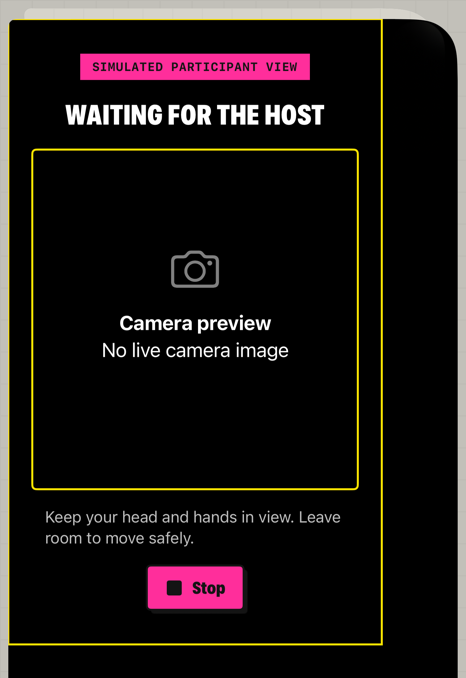
The app’s diagnostic participant view, presented on the simulator’s main screen. It demonstrates the participant layout and status text. This is not a capture of the physical external display: there is no live camera feed or S/Z cue in this screenshot.
Text overlays require attention to mirroring. PreviewImage applies a horizontal flip to the camera image itself. The cue is then composed over that view using .overlay. As a result, the player sees a mirror-like preview while the letter remains upright and readable. Flipping the entire container would also flip the text.
The current live cue is a large, dark letter on a yellow rounded badge with a white border. Both letters use the same presentation. The letter carries the instruction; color does not reveal a different rule before the player reads it. The surrounding interface also includes framing guidance and a recording indicator. Reduce Motion disables the indicator’s repeating pulse.
Turning text on the outer screen into a game mechanic.
Visual S/Z mode makes the external display part of the challenge itself. The host selects an action, such as “hold up four fingers on your right hand.” The app speaks that action without the phrase “Simon says.” After speech completes, the external screen briefly displays one of two letters:
| Cue | Participant’s task |
|---|---|
| S | Perform the spoken action. |
| Z | Refrain from performing the spoken action. |
The host can choose a cue duration of 0.5, 0.75, or 1.5 seconds. In each case, the participant must combine the spoken instruction with the information shown on the external display. The second screen now has a direct effect on how the game is played.
The timing is more careful than setting a Boolean and starting a timer. Before Visual S/Z can be sent, the camera must be ready and the accessory must be enabled, available, and presented. These are separate conditions. Requesting an accessory does not establish that its content has appeared.
After the speech service reports completion, the game requests the cue. The actual participant cue view acknowledges its appearance through onAppear, passing the cue’s unique identifier back to the session store. The store records a monotonic onset time and a position on the accepted recording timeline. Only then does the response window proceed. A missing acknowledgement within half a second voids the attempt without penalty.
That handshake also protects against a subtle development mistake. A simulated participant view on the host screen must not acknowledge delivery on the external screen. The implementation checks simulated before calling the cue callbacks, so a diagnostic preview cannot satisfy the real presentation requirement.
An appearance callback measures application presentation, not the instant a physical display illuminates a pixel. Measuring that last step still requires hardware testing. The implementation records useful timing information without claiming frame-perfect synchronization between SwiftUI, the display, the speaker, and the camera.
One game state coordinates both interfaces.
Simon Says Duo is built with SwiftUI and observable stores. GameFlowStore manages the consent, setup, and game stages. GameSessionStore owns the active session, selected player, challenge state, accessory readiness, scoring, and coordination with the media services. Both stores are isolated to the main actor, where their observable state drives the interface.
The supporting components have specific responsibilities:
| Component | Responsibility |
|---|---|
GameFlowStore | Setup draft, permission flow, participant agreement, starting and resuming games. |
GameSessionStore | Challenge lifecycle, host controls, participant presentation, timing, results, and interruption handling. |
CameraCaptureService | Camera and microphone configuration, sample handling, recording, and preview frames. |
SpeechPromptService | Preparing speech as an audio asset and reporting playback completion. |
PromptDelivery and game models | Prompt wording, delivery settings, snapshots, saved games, and score queries. |
LocalRepository | Local metadata, media locations, retention, and persistence. |
VisualCueExport | Rendering the saved S/Z cue into a derived video at its recorded interval. |
The game progresses through explicit phases. A typical recorded attempt moves from readiness through preparation, recording lead-in, speech, response, recording tail, host review, and completion. This makes the rules for each control easier to express. The host cannot change an active challenge halfway through capture, and an unresolved result must be handled before normal progression resumes.
At Send, the app freezes a ChallengeSnapshot. It records the player and host, resolved instruction, rule, response duration, speech settings, and any visual cue. Catalog actions also retain their identity, version, category, action text, and parameters. Later changes to the picker or catalog do not rewrite what happened in a saved attempt.
Verdicts are recorded as a history of changes. The latest verdict determines the score contribution, and voided attempts contribute nothing. Correcting a result therefore replaces that attempt’s effective outcome instead of adding another point. Deleting its video can leave the result intact.
Camera direction belongs to the view looking at it.
A device with multiple display surfaces makes camera selection more interesting. The app needs to know which camera faces the participant in the current configuration. A fixed assumption about a camera’s front or back position is insufficient to describe that relationship.
DirectionProbe bridges a small UIKit view into SwiftUI and attaches an AVCaptureDeviceDirectionCoordinator to it. The host probe examines backward-facing descriptors relative to the host view. The participant probe examines forward-facing descriptors relative to its own view. Both report camera identifiers to the session store.
During setup, the host-side information can suggest the camera. During an active attempt, a direction update that no longer includes the selected camera interrupts the challenge and asks the group to reframe. The implementation avoids silently switching cameras midway through the recording. That preserves a clear relationship between the instruction, the participant, and the captured evidence.
Rotation, backgrounding, audio-route changes, capture interruptions, and loss of the external accessory also feed into interruption handling. The app cancels the active work, stops capture, removes incomplete media, and offers a retry without consuming a scored challenge. Generation identifiers prevent delayed asynchronous callbacks from continuing an attempt that has already been abandoned.
One capture pipeline supplies the previews and recording.
The app uses a single AVCaptureSession with video and microphone sample outputs. Those samples feed an AVAssetWriter; video samples also produce the images displayed by the host and participant interfaces.
CameraCaptureService is a Swift actor using a dedicated serial executor. The capture delegates run on that same queue, keeping mutable media-buffer work together. The main actor receives the resulting preview images rather than coordinating the writer’s sample handling.
Recording takes priority over preview conversion. The service requests 1080p when available and targets 30 frames per second when the selected camera format supports it. Preview generation is throttled to roughly 10 frames per second, with frames scaled down before becoming UIImage values. Both interfaces therefore share the same camera source while the UI does less work than the recording path. These are implementation targets; sustained performance still depends on device profiling.
The preview uses aspect-fit presentation, preserving the captured framing rather than cropping it to fill the panel. Mirroring happens in the preview view. The saved capture does not acquire that UI mirror transform.
Recording begins before the instruction is played. The game waits until both accepted video and audio have reached a 0.75-second lead-in. Its media timeline is the minimum of the latest accepted audio and video times, so progress in one stream cannot hide a stalled second stream. After the response window, it records a further 1.5 seconds before finalization.
The pipeline also bounds recording to 20 seconds, checks available storage, rejects excessively long prompt-and-response combinations, and detects writer pressure or missing samples. These conditions matter in a party setting, where a failed recording should lead to a clear retry instead of a misleading saved result.
Speech, replay, and the visual cue share a recorded history.
Speech is synthesized into a local CAF audio asset before playback. Preparing the asset first gives the app a known duration and a reusable narration source. Playback start and completion are mapped onto the recording timeline.
For spoken challenges, a derived narrated MP4 can mix the prepared voice into the recording. Room audio is reduced to 12 percent during narration, with short fades. This can reduce the competing speaker recording, although it also lowers reactions occurring at the same time. The original capture is preserved.
Visual S/Z recordings need a different export path. The live SwiftUI overlay is not part of the camera’s raw pixels. A raw clip alone would omit the letter that told the player whether to act, making the replay incomplete as an account of the challenge.
VisualCueExport solves that by rendering the saved letter into a derived MP4. An asynchronous Core Image video composition checks each frame’s composition time against the stored cue interval. Frames inside that interval receive the badge; frames before and after it retain the source image. The export keeps the original microphone audio and does not speak the letter or burn a verdict into the picture.
The exported badge currently uses white text on a dark background, while the live interface uses the yellow retro badge. The recording preserves the cue’s identity and saved timing rather than reproducing every pixel of the external interface. Preview and sharing use the same generated visual export. If generation fails, the app offers Retry instead of silently sharing a raw recording that lacks the cue.
The surrounding product flow makes the device feature usable.
The retro interface gives the game large controls, strong borders, and distinct panels for actions and results. Game, Scoreboard, and Clips remain separate host destinations. Current Game and All Saved scopes keep a long-running collection of clips separate from the session being played.
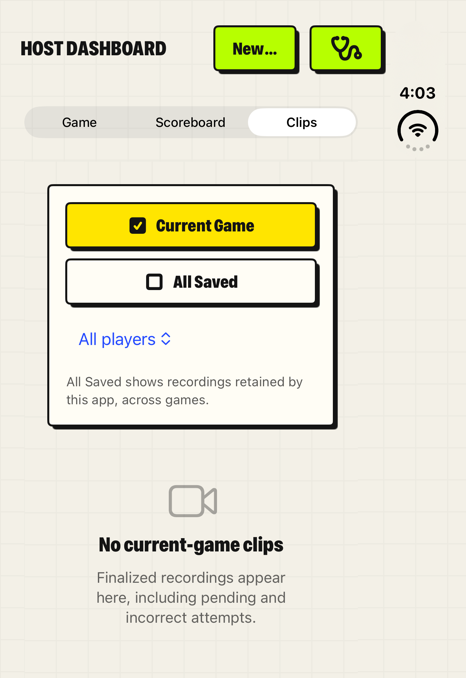
The Clips destination. This nonrecording demonstration has no saved video; recorded attempts populate the gallery during recording-enabled play.
Consent is part of the flow before camera preparation, and participant agreement is tracked individually. A cold launch requires a fresh acknowledgement before recording resumes. Saved game state can restore the roster, progress, settings, and pending review, but it does not restore technical camera readiness or automatically restart capture.
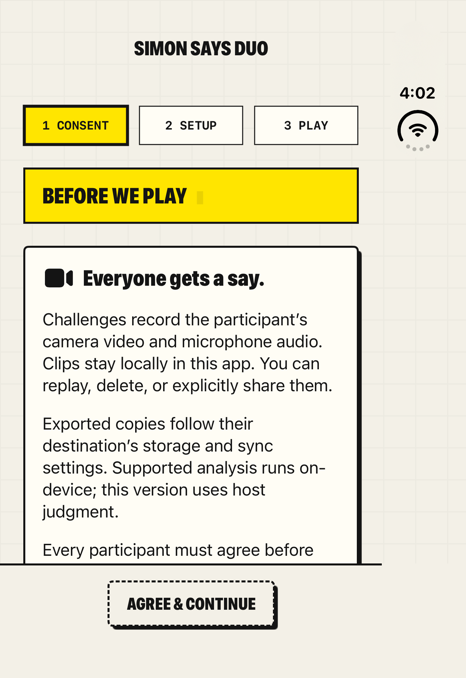
Consent precedes setup and camera preparation. Nonrecording play provides an alternative for the spoken game.
Media and JSON metadata stay in the app’s Application Support directory, which is excluded from backup. Launch-time cleanup removes media older than seven days while retaining outcome metadata. Optional session-end deletion and explicit clip deletion offer additional control. Preview and sharing acquire media leases so deletion cannot remove a file while the app is using it.
Sharing is an explicit action through the system share sheet. The application has no backend, account system, analytics service, or remote recognition pipeline. Copies exported elsewhere follow the behavior of the destination chosen by the user.
Simon Says Duo gives the iPhone Duo’s external display a specific role in a shared activity. The host can manage the game while the participant sees themselves, reads timely guidance, and receives a visual instruction that changes what they should do. The same challenge then carries its wording, timing, result, and media into review. That complete path is the reason to build the app around the device: each display serves the person looking at it, while one coordinated game keeps the experience coherent.